Calendar For Android
- 3.8
- Rating
- 100.00K
- Installs
- Free
- Price
 Analysis by App-foxy
Calendar For Android is a straightforward productivity app from GALLERY PRO that I would describe as a practical planning tool rather than a full personal-management system. I used it with a simple goal in mind: keep everyday events visible, add reminders without unnecessary effort, and avoid turning calendar maintenance into another task. That focus is also where the app makes the most sense. It is aimed at people who want an accessible Android calendar for ordinary appointments, errands, study sessions, family plans, and small work commitments.
The app is free to install, and the basic appeal is easy to understand: you can begin organizing your schedule without paying upfront. There are also in-app purchases ranging from $0.99 to $44.99 per item, so I would not treat “free” as a promise that every possible option is included at no cost. The sensible approach is to start with the free experience, see whether its planning style fits you, and only then consider whether any paid item offers enough value for your own routine.
How Calendar For Android feels in daily use
The first thing I noticed is that this is an app I can imagine opening for a quick check rather than a long planning session. That matters because most calendar use happens in small moments: checking whether an appointment conflicts with lunch, confirming what is happening tomorrow, or adding a reminder while the information is still fresh. A calendar that makes those actions feel heavy quickly becomes something I stop using.
You May Also Like

 Blood Strike: 2.5 Anniversary
Blood Strike’s Loadouts Turn Every Drop Into a Tactical Gamble
A close look at Blood Strike’s custom loadouts: how fast access to signature weapons reshapes its battle royale rhythm, rewards preparation, and narrows the gap between fights.

 Pandora - Music & Podcasts
Pandora’s Music Is Easy to Start, but Harder to Recover
Pandora’s strength is its low-effort path from a seed to a station. Its weak spot is how much confidence it asks you to place in connection, setup, and quiet recovery.

 8 Ball Pool
 Is Built on Rivalries, Rematches, and Routine
A close look at the rivalries, rematches, shared routines, and unanswered safety questions that turn a quick pool match into a persistent mobile community.

 Samsung Music
’s Quiet Strength Is Playing What You Already Own
Its reach comes less from spectacle than from dependable access to a personal library. That simplicity is both the app’s strongest retention engine and its ceiling.

 AccuWeather: Weather Radar
AccuWeather Review: A Quick, Clear Forecast for Everyday Decisions
For everyday plans, the best forecast is the one you can understand quickly. AccuWeather makes rain timing, radar, and local conditions easy to act on, with a few trade-offs.

 Hill Climb Racing
Why Hill Climb Racing Still Turns Crashes Into One More Run
A tiny car, a bumpy hill and one more upgrade: Hill Climb Racing keeps resurfacing because its simple chaos makes every near-miss feel personal.
More From Our News Desk
View All News


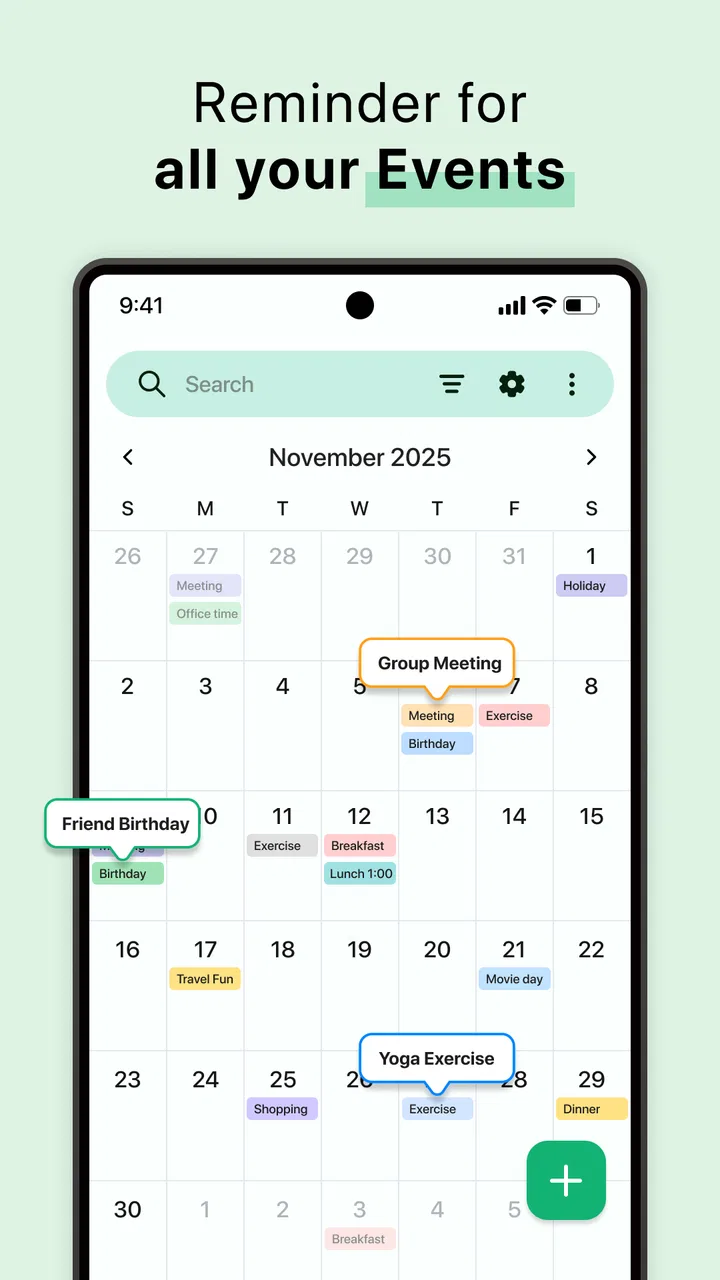
Calendar For Android works best when I treat it as a visual anchor for the day. I can look ahead, identify the busy parts of a week, and place reminders where they are useful instead of relying on memory. The experience feels particularly suitable for users who do not need a complicated project-management workspace attached to every event. If your main question is “What do I have coming up?” this app stays close to that question.
That simplicity has a useful side effect: it encourages better calendar habits. I found it easier to enter small commitments that I might otherwise forget, such as returning a call, preparing something before an appointment, or setting aside time for a personal task. These entries may seem unimportant individually, but they prevent the calendar from showing only major events while leaving the rest of the day unmanaged.
Planning a realistic day instead of filling every space
One practical workflow is to use the calendar in two passes. I first enter fixed commitments, such as appointments or classes. Then I add reminders for preparation and travel-related tasks, leaving breathing room between them. This prevents the common mistake of treating every open part of the day as available. A calendar becomes more useful when it reflects the time an activity really consumes, not just the official start time.
For example, imagine I have a medical appointment in the afternoon. I can place the appointment itself on the calendar, then add a reminder earlier in the day to gather documents or questions. I might also reserve time afterward rather than immediately scheduling another obligation. Calendar For Android is valuable in this kind of ordinary scenario because it connects the event with the surrounding actions that make the event manageable.
I also like the idea of using separate entries for preparation and follow-up instead of writing everything into one crowded title. That makes the schedule easier to scan. It is a small organizational choice, but it helps distinguish “the meeting” from “the thing I must do before the meeting,” which are often confused when people depend on memory alone.
Where the reminder-focused approach helps
The reminder side of the app is most useful when a task has a clear time relationship. A reminder for an appointment, a deadline, or a scheduled call is easy to understand. It is less suited to vague intentions such as “work on a long-term goal sometime this week,” where a task manager or notes app may offer a better structure. I would use this calendar to give a task a place in time, not to manage every detail of a complex project.
That distinction is important when comparing it with usual alternatives. A basic phone calendar may cover similar ground, while a large cloud-based calendar platform may offer deeper sharing, account connections, and collaboration. A task manager may be better for checklists, recurring work, and projects. Calendar For Android sits in the middle for me: more focused than a general notes app, but not something I would automatically choose as the central system for a team or a complicated workflow.
If you already have a calendar service that handles your appointments perfectly, switching may not be worthwhile. The strongest reason to try this app is not that every other calendar is inadequate; it is that you may prefer a lighter Android experience for personal planning and reminders. The value depends on whether its direct approach feels easier than the tools already on your phone.
What the current app details tell me
Calendar For Android is listed as a Productivity app developed by GALLERY PRO. It has a 3.8 average from around 3.8 thousand ratings, with 567 reviews, and has passed 100 thousand installs. Those figures suggest that it has found a real audience, although the rating also tells me to keep expectations measured rather than assuming a universally polished experience.
The app was released on March 25, 2025, and the current version is 2.7. It supports devices running Android 8.0 or later, which makes it accessible to many Android users with older phones as well as newer models. Its Everyone content rating also fits the general-purpose nature of the app: it is designed for ordinary scheduling rather than a narrowly restricted audience.
I would still check the version shown on my own device before relying on it for an important routine, especially if I use an older phone. Compatibility is not only about installation; the overall experience can also depend on how comfortable the interface feels on a particular screen and Android setup. The stated minimum of Android 8.0 is reassuring for reach, but it does not by itself guarantee that every device will feel identical.
Free access and the question of paid value
The clearest cost advantage is that the app is free to install. That lowers the risk of trying it for a few days with real events instead of judging it from a description. I would begin by entering the appointments and reminders I actually need, not by creating an imaginary perfect schedule. After that trial, it becomes easier to decide whether the free access already solves the problem.
Because in-app purchases are available from $0.99 to $44.99 per item, the phrase “free calendar” needs a little care. The purchase range is broad, so the price of a particular item matters far more than the existence of purchases alone. I would not pay simply because a premium option is visible. I would first ask whether it removes a specific limitation that affects my routine and whether I would use that improvement repeatedly.
This is also where the app’s rating influences my buying attitude. With a 3.8 average, I would be comfortable testing the free version but cautious about committing to the highest-priced purchase without first confirming that the app fits my expectations. Free access provides a reasonable evaluation period; it does not automatically make every paid option good value.
For someone who only needs a simple calendar and reminders, the free starting point may be enough. For someone comparing paid productivity tools, the decision should be based on the exact benefit offered by the purchase, not on the app’s installation count or its general category. I would keep the spending proportional to how much planning friction the app removes from my life.
Small habits that make the app more useful
My first tip is to avoid entering events with titles that are too short to be useful later. “Call” may make sense at the moment, but “Call dentist about follow-up” gives much better context when I glance at a busy week. The calendar is not just a place to store times; it is a memory aid. A few extra words can prevent confusion without turning each entry into a paragraph.
My second tip is to add preparation reminders separately. If I have an appointment that requires paperwork, equipment, or a message to someone else, I would create an earlier reminder rather than trusting the event title to carry everything. This creates a simple chain: prepare, attend, and follow up. It is particularly helpful for events that look distant when first scheduled but become stressful when preparation is postponed.
My third tip is to review the next few days at a consistent moment, perhaps when planning the following day. This is more effective than waiting for the calendar to rescue me from every forgotten task. A quick review helps reveal collisions, unrealistic timing, and events that need an earlier reminder. The app supports this habit by keeping planning centered on dates and times rather than burying the schedule inside a larger system.
A fourth useful trade-off is to keep personal and work-related entries descriptive but not overloaded. If I put every detail into one event, the calendar becomes difficult to scan. If I put too little, I have to search elsewhere. I would use the event for the essential time-based information and place only the most relevant context in the title or reminder. That balance keeps the week readable.
Limitations I would consider before relying on it
The first limitation is scope. Calendar For Android is not automatically a replacement for a full task manager, a shared team planner, or a detailed project board. If my work involves assigning tasks to several people, tracking stages, attaching extensive project information, or coordinating a group schedule, I would choose a more specialized tool. A personal calendar can show when something happens, but that is not the same as managing everything required to make it happen.
The second limitation is that a simple calendar can expose gaps in a workflow rather than solve them. I may remember to add an event but forget to add preparation time. I may create a reminder but give it an unclear label. The app can support better planning, yet the quality of the result still depends on how deliberately I enter information. Users looking for a system that automatically organizes a complicated life may find this approach too hands-on.
The purchase structure is another point of caution. Since paid items range from $0.99 to $44.99, I would inspect each purchase carefully before confirming it. I would want to know exactly what practical improvement I am buying and whether the free version has already demonstrated that the app is reliable enough for my needs. A low-cost item may be easy to justify, while a much larger purchase deserves a longer trial and a clear reason.
The 3.8 average also suggests that the experience may not satisfy everyone equally. I would interpret that as a reason to test the actual workflow on my phone, especially if calendar use is critical for work or appointments. A product can be perfectly adequate for casual personal scheduling and still fall short for someone who needs advanced coordination every day.
Who is most likely to get good value
I think the best match is someone who wants an uncomplicated Android productivity app for personal events and reminders. Students can use it to separate classes, study blocks, and submission reminders. Parents may find it useful for keeping appointments and family commitments visible. People with irregular routines can use it to give important tasks a definite place instead of holding everything in their heads.
It may also suit someone moving away from paper planning but not ready for a large digital organization system. The calendar format is familiar, and the free entry point makes experimentation easy. I would recommend starting with one week of genuine commitments rather than migrating every old event immediately. That gives a clearer sense of whether the app feels natural during real use.
It is less convincing for users who need a shared household calendar with extensive collaboration, a business scheduling platform, or a task system built around projects and checklists. Those users should compare the app with tools designed specifically for shared calendars or task management. Calendar For Android can still be part of such a setup, but I would not assume it can replace those specialized tools.
It is also not the right choice for someone who dislikes manually maintaining a schedule. The app is useful when I take a moment to enter events, choose meaningful reminder times, and review what is coming. If I rarely record commitments, even a capable calendar will remain empty and provide little benefit.
My final recommendation for trying it
I would try Calendar For Android when I wanted a free, focused way to organize everyday events on an Android device, especially if my current method was a mixture of memory, paper notes, and scattered reminders. The app’s accessible Android requirement, Everyone rating, and free installation make the first step uncomplicated. Its strongest value is practical: it gives ordinary commitments a visible time and helps turn vague intentions into scheduled actions.
I would approach the paid side carefully. The available purchases run from $0.99 to $44.99 per item, so I would use the free experience first and judge any upgrade by a specific recurring benefit. I would not buy based only on the promise of a more complete calendar. I would buy only if the feature addressed a problem I had already experienced while using the app.
My verdict is positive but deliberately limited: Calendar For Android is worth trying for personal scheduling, not blindly adopting as an all-purpose productivity system. It delivers the most value to people who want a clear place for events and reminders without the weight of a large platform. I would skip it in favor of a more advanced alternative if collaboration, project tracking, or a deeply connected calendar ecosystem were essential.
For a friend, my advice would be simple: install it, enter a normal week, add preparation reminders for two or three important events, and review how naturally the routine fits. If the free version makes your days easier to see and remember, it has already earned its place. If you need more than scheduling and reminders, recognizing that early will save you from forcing a lightweight calendar to do the work of a much broader productivity tool.
FAQs for Calendar For Android
01What features does Calendar for Android offer?
Calendar for Android provides a comprehensive suite of features to manage your schedule efficiently. It includes event reminders, customizable views (daily, weekly, monthly), integration with other calendar apps, and synchronization across devices. The app also supports adding notes, attaching files, and setting recurring events to streamline your planning.
02Is Calendar for Android free to use or does it have any in-app purchases?
Calendar for Android is free to download and use, offering essential features at no cost. However, it includes optional in-app purchases for premium features such as advanced customization options, ad-free experience, and enhanced support. Users can enjoy the basic functionalities without making any purchases.
03How does Calendar for Android handle privacy and data security?
Calendar for Android prioritizes user privacy and data security by implementing robust encryption methods for all stored information. The app does not share user data with third parties without consent and provides options for users to manage their data preferences. Regular updates ensure compliance with the latest security standards.
04Can Calendar for Android integrate with other apps and services?
Yes, Calendar for Android seamlessly integrates with popular apps and services such as Google Calendar, Microsoft Outlook, and various task managers. This integration allows users to import, export, and synchronize events and tasks effortlessly, providing a unified and organized scheduling experience across different platforms.
05What are the customization options available in Calendar for Android?
Calendar for Android offers extensive customization options to tailor the app to your preferences. Users can choose from various themes, adjust color schemes for different calendars, set custom notification sounds, and configure the layout to display information that suits their needs. This level of personalization enhances user experience significantly.
Pros
- User-friendly interface with intuitive navigation.
- Seamless syncing with multiple devices.
- Customizable notifications for events.
- Integrates with other productivity apps.
- Offers color-coded event categorization.
Cons
- Limited offline functionality.
- Occasional syncing delays.
- Ads in free version can be intrusive.
- Limited customization for recurring events.
- Some features locked behind a paywall.

Calendar For Android
Gallery